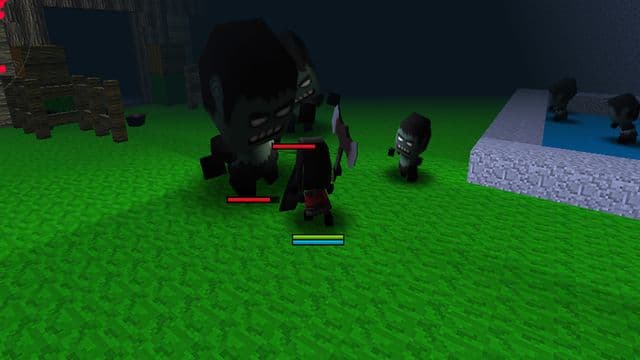
ZombieCraft 2
By AngryGamez
ZombieCraft 2 is a free browser action RPG from AngryGamez where you choose a character, arm yourself with an axe, sword or another item, and fight off zombies. The counter is the point: reach 50 kills and you move up to the next level. It runs in your browser on desktop and mobile with no download, and there is nothing to pay.
Game info
- Developer
- AngryGamez
- Rating
- Not yet rated
- Release date
- Jul 16, 2019
- Last updated
- Sep 28, 2026
- Technology
- Unity WebGL
- Platforms
- Web Browser (Desktop, Mobile)
Controls
- W, A, S, D — move
- Left mouse click — attack
- Tab — show or hide the mouse cursor
- Mouse click on item or quest buttons — use menus while the cursor is shown
Related Games















How to Play ZombieCraft 2
Start by picking the character you want to play as, then gear up with a weapon — an axe, a sword or another item from your kit. From there the loop is simple: move with WASD, close the gap on a zombie and hold down left clicks to swing until it drops.
Your kill count is the progress bar. Once you have taken down 50 zombies, you advance to the next level, so it pays to keep hunting rather than hanging back. The kill total is also the number to compare with friends.
Pressing Tab toggles the mouse cursor on and off. With the cursor showing you can click the item and quest buttons on screen to change your gear or check what you have been asked to do, then hide it again and go back to fighting.
Tips
- Count your kills — 50 zombies is the threshold that takes you to the next level, so keep pushing instead of idling in a safe corner.
- Try more than one weapon. The gear list includes axes and swords, and picking a favourite early makes each fight quicker.
- Use Tab to bring up the cursor when you need the item or quest buttons, then hide it again before you re-enter a fight.
- Keep moving with WASD between swings rather than standing still while zombies close in.
Features
- Choose your character before you start
- Equip melee gear such as axes and swords
- Kill counter that tracks your total for bragging rights
- Reach 50 kills to unlock the next level
- Item and quest buttons accessible with the mouse cursor
Frequently Asked Questions
Is ZombieCraft 2 free to play?
Yes, it is completely free and runs in your web browser with no download or install.
Can I play ZombieCraft 2 on my phone?
Yes, it supports both desktop and mobile. It is built for landscape, so turn your device sideways for the full view.
Who made ZombieCraft 2?
It was developed by AngryGamez and released in 2019, built with Unity WebGL.
How do I get to the next level?
Kill 50 zombies. Once your count hits that number you move on to the next level.
How do I change my weapon or check a quest?
Press the Tab key to show the mouse cursor, then click the item or quest buttons on screen.