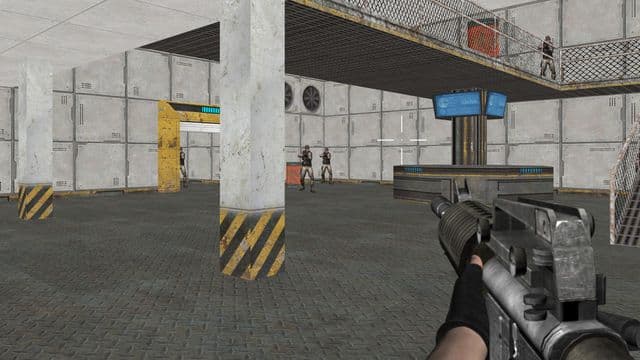
Warfare Area
By SDV Imants Klava
Warfare Area drops you into a base that enemy forces have already taken, with your squad gone and only your rifle left. You play the last soldier standing and fight to push the attackers back. It runs free in the browser on desktop and mobile, built with Babylon.js, with no download or account needed.
Game info
- Developer
- SDV Imants Klava
- Rating
- Not yet rated
- Release date
- Nov 26, 2019
- Last updated
- Sep 28, 2026
- Technology
- Babylon.js
- Platforms
- Web Browser (Desktop, Mobile)
Controls
Keyboard & mouse
- W, A, S, D — move the soldier
- Arrow keys — move the soldier
- Mouse — turn the character and aim
- Mouse click — shoot
Touch
- On-screen joystick (left) — move
- Fire button — shoot
- Drag on the right side of the screen — turn and aim
Related Games
















How to Play Warfare Area
The setup is simple: your troop is wiped out, the enemy holds your base, and you are the only one left to shoot your way through it. You pick up the rifle and take the fight back through the base area.
Movement and aiming are split between two hands on desktop. WASD or the arrow keys walk your soldier around the base, while the mouse turns the character and lines up the rifle. Clicking fires. Because the mouse controls both which way your soldier faces and where the shot goes, turning to face a new enemy and aiming at them is one motion rather than two.
On mobile the same loop is handled by touch: a joystick on the left side of the screen for walking, a fire button for shooting, and a drag on the right side of the screen to swing your view and aim. The game is meant to be played with the device held in landscape.
Tips
- Keep a hand on WASD while you aim: since the mouse both turns your soldier and points the rifle, you can keep walking while swinging your aim onto a target.
- On mobile, rest your left thumb on the joystick and use short drags on the right side rather than long swipes, so your aim does not overshoot past an enemy.
- Play in landscape on a phone or tablet — the joystick and fire button are laid out for a wide screen.
Frequently Asked Questions
Is Warfare Area free to play?
Yes, Warfare Area is free and plays directly in your web browser. There is nothing to download or install.
Can I play Warfare Area on my phone?
Yes, the game supports mobile as well as desktop. On a touch screen you get an on-screen joystick for movement, a fire button, and you drag on the right side of the screen to aim; hold the device in landscape.
Who made Warfare Area?
Warfare Area was developed by SDV Imants Klava and released in 2019. It was built using the Babylon.js engine so it runs in the browser.
Is Warfare Area multiplayer?
No, it is a single-player game. The premise is that you are the last soldier left from your troop, fighting the enemies who captured your base.
How do I shoot in Warfare Area?
On desktop you aim with the mouse and click to fire your rifle, while WASD or the arrow keys move your soldier. On mobile, tap the fire button and drag on the right side of the screen to aim.