Candy Box 2
By aniwey
Advertisement
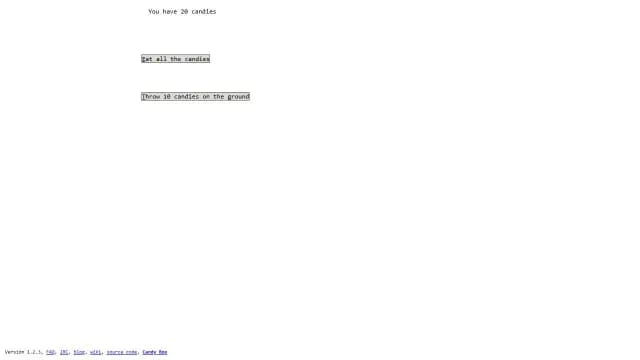
Candy Box 2 is a free browser game built entirely from text and ASCII-style characters. A counter at the top tells you how many candies you have, and a short list of clickable actions sits below it. You play by clicking those lines — eating your candies, throwing some on the ground — and seeing what happens. It runs in a desktop browser with no download.
Game info
- Developer
- aniwey
- Rating
- Not yet rated
- Release date
- Oct 24, 2013
- Last updated
- Nov 15, 2026
- Technology
- HTML5
- Platforms
- Web Browser (Desktop)
Controls
- Mouse — click the text actions on the page, such as "Eat all the candies" or "Throw 10 candies on the ground"
Advertisement
Related Games

How to Play Candy Box 2
Everything happens on one plain white page. The line at the top reads "You have 9 candies" and updates as your total changes. Underneath it are the actions available to you, written as text links in small boxes: "Eat all the candies" and, once you have enough, "Throw 10 candies on the ground".
Clicking an action carries it out immediately. Eating wipes your stock; throwing spends ten candies at once. Because the whole interface is text, there is nothing to aim at or dodge — the choice is simply which action to click and when, and whether to spend your candies now or hold the number higher.
Along the bottom of the page you will see the version number and a row of small links. The game keeps its interface deliberately bare, so pay attention to the counter and to any new line of text that appears: new wording is the game's way of telling you something has changed.
Tips
- Read every new line of text. With no graphics, the wording of an action is your only clue to what it does.
- Eating all your candies resets the counter to nothing, so think before you click that one.
- Actions like throwing ten candies only appear once your total supports them — watch the counter rather than the screen.
Features
- A text-only interface: a candy counter and clickable action lines, no graphics to load
- Made in TypeScript with a bit of HTML and CSS
- Source code is publicly available under the GPLv3 licence
- No ads on the original site
Frequently Asked Questions
Is Candy Box 2 free to play?
Yes, it is completely free and runs in your web browser with no download or install.
Who made Candy Box 2?
It was created by the developer aniwey and released in 2013. The source code is public and licensed under GPLv3.
Can I play Candy Box 2 on my phone?
The verified platform for this game is desktop, so play it on a computer in landscape in your browser.
What are the controls?
You only need the mouse. Every action is a line of text you click, such as eating all your candies or throwing ten on the ground.
Why does the game look like plain text?
That is intentional — Candy Box 2 is built as a text-based game, with a candy counter and clickable text actions instead of artwork.